Memova Learners Teachers Vocabulary test Tutors Pricing Help Українська
memova

The memova extension for Chrome

memova is an app for learning words: your own decks, spaced repetition, training games, a library of texts and videos, lessons with a teacher. The extension brings the word card to any page and into the YouTube player.

What it does

A word card on any page

Ctrl+click a word for its form, base form, translation, frequency and “Add to my words”. Ctrl+select several words for the same on a phrase. Or select text and click the memova icon. The extension tells the page's language itself, and the card lets you change it.
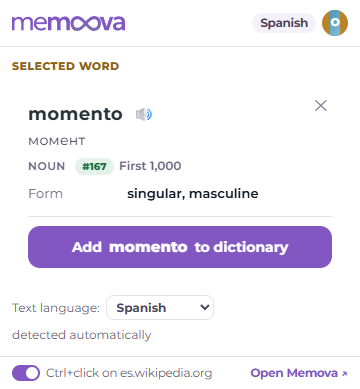
The icon's window with the card of a selected word

Subtitles with clickable words in the YouTube player

On a video page the extension draws its own subtitle line from the captions the player already loaded. The word being spoken is highlighted; a click pauses the video and opens the card. The m button in the player's bar turns the line off and brings YouTube's subtitles back.

A video into your library

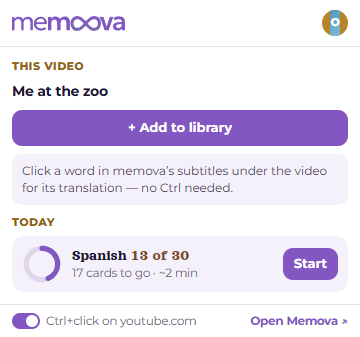
On a video page the icon becomes a “+”: one click, and the video with its captions becomes a material in your memova library, where words go into your decks. The video itself stays on YouTube; nothing is downloaded.

The icon's window on a YouTube video page

Your day

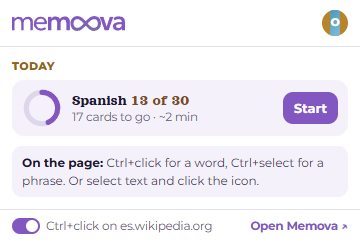
The icon's window shows how many cards are left to today's goal in each language you learn, and “Start”.

The icon's window: how many cards are left to today's goal

What it asks for, and why

  • All sites — so that Ctrl+click works on any page. The script only waits for a Ctrl+click or a selection; until you pick something, nothing is read from the page and nothing is sent anywhere. It can be switched off per site from the icon's window.
  • Active tab — to read the selected text and the video's address at the moment you click the icon.
  • Storage — the key to your account and the list of your languages live in the browser, on this device.

Privacy

The extension sends memova only what you picked: the word or phrase with the sentence it stands in, and the captions of a video you add. No ads, no trackers, nothing is sold. The details are in the privacy policy.

Install

You need a memova account — it is free. The extension connects to it with a key you create in the settings and can revoke at any time.

Install from the Chrome Web Store
Step-by-step setup Sign in or create an account memova help

Open Memova