My day
The home page: one goal for today in the language you are learning, a button to reach it, and everything worth doing next to it.
Goal and ring
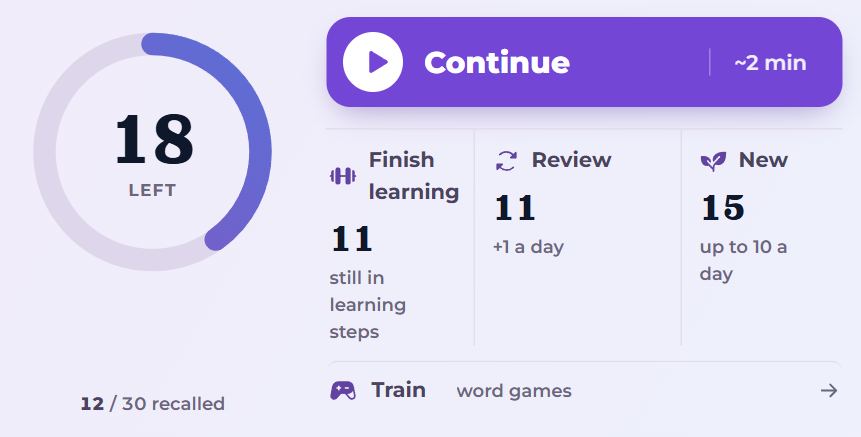
The goal is how many cards you recalled correctly today. A card counts once a day: when your answer in a review is better than “Forgot”, or when the word went through training. How many times the card came round does not matter.
- In the middle of the ring: how many are left to the goal; the arc fills with every card counted.
- Under the ring: “12 / 30 recalled” — done and the goal. When the goal is met, the ring closes.
- Only you change the goal: Settings → Study plan or the “Plan” dialog. The app never adjusts it on its own — at most it suggests a change, see “Let’s compare notes”.
The “Start” button and the queue
The big button opens today’s review. Until today’s first session it says “Start”, after that “Continue”; on the right, roughly how many minutes it takes at your pace.
Under the button, what the session will take:
- Still learning — words still in their learning steps (seen recently, repeated after minutes and hours). A word you have just answered right stays here until its last step — it already counts toward the goal;
- Review — words due for review today; “+1 a day” is how many new reviews come due on an average day;
- New — how many unseen words the session still takes today: your limit (“up to 10 a day”) less the ones you have already met today. When there are fewer reviews than are left to the goal, the session takes more new words — exactly enough to make the goal reachable — and the row says so: “4 by plan + 26 for the goal”. The limit in the plan does not change: tomorrow it is the plan again. A limit of 0 (“no new words for now”) is never exceeded.
Together the three are what the review calls “in the queue”.
Next to “New” is the stock: how many days of your limit the unseen words will last (“7 days in stock”). It stays grey while there are enough, or while the reviews alone fill the goal; it turns brick (“none in stock”) when the stock is nearly gone and the goal will need new words. Tap it for three ways to refill: the library, “20 commonest words” of the language in one tap (with translation and sound, into the deck “Commonest words”), or a word of your own.
When the goal needs words the collection simply does not have, the end of the ring’s track is dotted in brick: that much cannot be filled today.
The order of new words is the order of your decks on the Words page: the higher a deck, the sooner its words come.
When reviews pile up
After a few missed days a chip appears by “Review”: “zero by Oct 21” — at your current goal the pile is gone by that date — or “pile growing” — the goal is smaller than the reviews that come due each day. Tap the chip for two ways out:
- A goal at which the pile stops growing — with an estimate of minutes a day;
- Spread the overdue cards over the days ahead — for example “over 20 days, ~80 a day”: the overdue words get new dates, every day becomes a little heavier, but none is lost. Nothing is spread over more than 30 days.
Train
The row “Train — word games” opens Training. If some words do not stick (forgotten three times in a row), the row says how many and roughly how many minutes they take. Once the goal is met the row gives way to the button “Train hard words” under “Goal reached”, which leads to the same words. Training does not move the review schedule, but a word carried through it counts toward the goal.
Week and streak
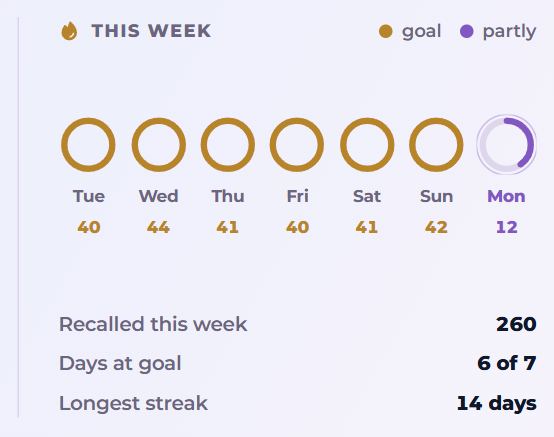
- Seven rings are the days of the week: gold — goal met, purple — partly; under each ring, how many cards were recalled that day.
- Recalled this week, days at goal (“6 of 7”) and the longest streak.
- The streak (the flame by the greeting) is days in a row at goal. Days off chosen ahead in your plan (up to two a week) do not break it.
Blocks below
Under the ring there are cards; each one appears when it is relevant.
Build the word
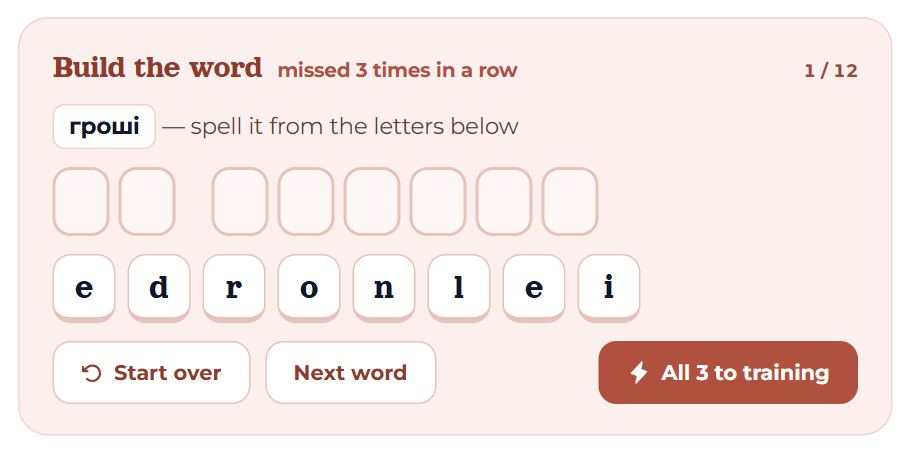
A word you forgot several times in a row: spell it from the letters. “Start over”, “Next word”, or “All 3 to training” — straight to training on exactly these words.
Word of the day
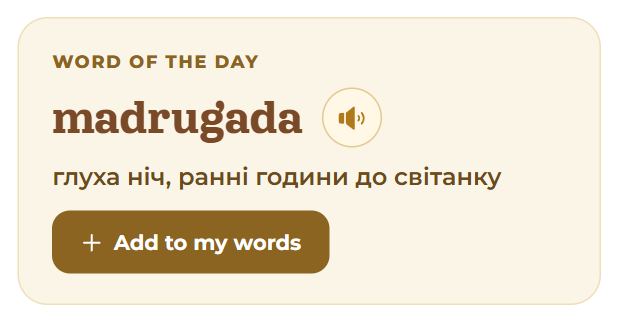
One word a little past what you know — taken from your test, from what you have learned, or from the start of the language; only nouns, verbs, adjectives and adverbs that are not on your cards yet. Listen to it and “Add to my words”. It can be turned off in Settings → Study plan.
Lesson
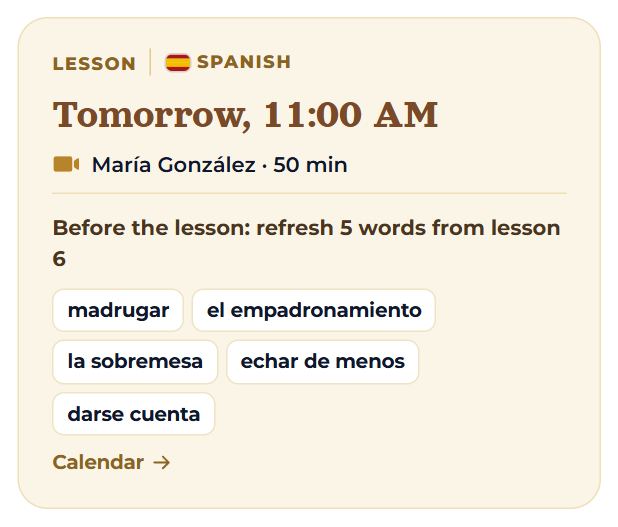
Your next lesson with a teacher: when, with whom, how many minutes, and “Calendar”. A day and a half before the lesson the card shows “Before the lesson” — the words from the last lesson and “Play through them”.
For your level, Add a word, New words
- For your level — texts from the library in which about 6% of the words are new to you, and never more than 20 in a hundred. Only those whose level is worked out from both their words and their sentences: songs, videos and verse stay out;
- Start with pictures — in its place while no text reads at your level yet: find-it-in-the-picture scenes and picture books, where the drawing tells you the word, and “20 commonest words”. If Memova does not know your words yet, the vocabulary test as well;
- Add a word — a field for one word (translation, example and sound are found on their own) and the other ways in: import from Anki or a table, words from texts and videos, the browser extension;
- New words — what was added this week and where from (a lesson, a text, the extension, by hand);
- Vocabulary test — in place of the ring while the language has no words yet.
Notices above the ring
They appear when there is something to say and go away as soon as you answer.
- “You’ve been away 5 days” — how many reviews piled up, and an offer to spread them over a few days at so many a day. “Spread” or “All today”. Days off from your plan do not count here.
- “5 more words to find” — the queue is shorter than what is left of the goal and there are no new words in stock. Ways to bring words: the library, the 20 commonest words of the language, a word of your own (and training the words that are not sticking, if there are at least four).
- “Where to get 5 words” — under the ring, when the whole queue is answered and the goal is not met. The big button turns gold — “Top up the stock” — and scrolls here: finish what you started (with how many new words are ahead), new at your level (only materials whose level counts both the words and the sentence length — no songs, verse or videos), the commonest words, your own.
- “Let’s compare notes” — every so often Memova sets your plan against how your days actually go: the minutes planned and the minutes it takes, how new words go in (how many of them get stuck), whether the pile grows, on how many days the goal was met — and suggests one change, such as “new words 10 → 7” or “goal 30 → 35”. “Yes”, “Keep as is” or “Review the plan”.
Several languages
Each language has its own day: its goal, queue and streak. The flag at the top of the menu switches between them (“Spanish · 12 of 30 today”); on a phone it is the flag at the top of the screen.
Settings that change “My day”
- Settings → Study plan: the daily goal, new words a day, retention (how early reviews come), the word of the day.
- The “Plan” dialog: how many minutes you will find even on a bad day → a goal and new words to match, “Lighter” / “Faster”, days off.
- Settings → Profile: your languages, how to address you.
- Settings → Notifications: goal reminders and the weekly summary.
Questions
- Why is the goal cards and not minutes?
- Minutes can be sat through. A word recalled is the progress itself. The app counts the minutes too and shows them in Statistics.
- If I answer “Forgot”, does the card count?
- No. It comes again later today; recall it then and it counts.
- I missed a day — what happens to the streak?
- The streak breaks, unless it was a day off chosen ahead. Your longest streak stays in Statistics.