Money
Accounting with no commission: students pay you directly, as you agreed, and Memova counts how many lessons took place, how many are paid and who owes whom — in lessons and, if a price is set, in money.
How it counts
- The unit is a 50-minute lesson. A 25-minute lesson is a half, so a balance can be fractional: 6½.
- A payment is “paid for N lessons”: a student’s claim that you confirm, or an entry of your own.
- A lesson that took place is deducted. A missed lesson and a late cancellation by the student are not deducted until you press “Deduct” yourself. A lesson cancelled by the teacher, or in good time, is never deducted.
- Never counted at all: a “Test call” (a call to check the connection) and the free intro lesson — in the lists they are marked “not counted”.
- Debt is lessons that took place before the payment came in. Lessons go in order of time: each is paid while the confirmed payments cover it. So a later payment settles the debt for earlier lessons — as in life.
Money does not pass through Memova, and it takes no cut. The price is only there so the balance reads in money too.
The month

The teacher’s menu → Money. The heading is the month; the arrows on the right are “Previous month” and “Next month” (not past the current one). Months are calendar months in your time zone. A lesson belongs to the month it took place in, a payment to the month you confirmed it in.
Four tiles

- Done — how many of this month’s lessons were deducted from balances, and how many hours that is.
- For lessons — those lessons in money at each student’s price: “deducted from balances”.
- Paid — payments confirmed this month, in money, and how many.
- Balance now — not for the month but as of today: how much students have paid ahead, and under it “and UAH 3,000 owed” or “no debts”.
Without a price the money tiles show “—”, and under the tiles: “No price set — accounting is in lessons, without money.” with a “Set a price” link.
Students’ claims

A student transfers the money as you agreed and presses “Report a payment”: how many lessons, a comment (“by card, from PrivatBank”), a receipt if they like. You get a notification, and a line appears above the table — “Olya Koval says they paid 5 · UAH 2,500” — with the date and the comment:
- “Confirm 5” — the lessons go onto the balance; the student is told;
- “Another number” — a different amount came in: it leads to the statement, where you type your own number and confirm it;
- “Not received” — the money did not arrive: the claim stays in the history as “not confirmed”, the balance does not change, the student is told.
Claims also wait on “Today” → “Waiting for you” and on the student’s page.
Who and how much

A row for each student:
- Student — the name, leading to the student’s page;
- Price — the price of a 50-minute lesson for this student;
- Done — this month’s lessons and what they are worth;
- Paid — what was confirmed this month, and under it “last payment 3 Oct” or “no payments yet”;
- Balance — as of today: “owes 6”, “6 ahead” or “settled”, and in money;
- “Statement” — the pair’s statement.
The month’s lessons
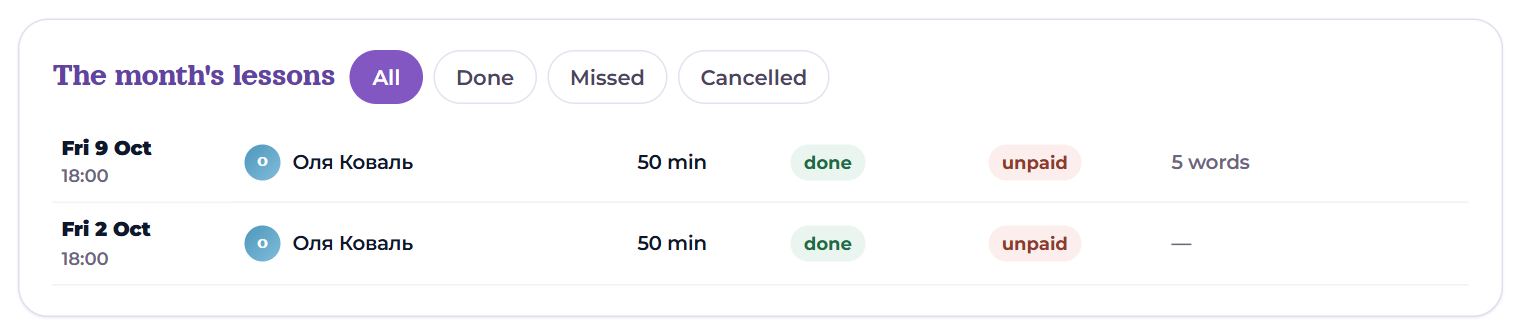
All your lessons of the month, newest first: day and time, student, length (and “outside Memova” if it was held elsewhere), status — “done”, “missed”, “cancelled” — and whether it is “paid”, “unpaid” or “not counted”; on the right, how many words were given in it.
- Filters: “All”, “Done”, “Missed”, “Cancelled”.
- 12 rows show first, then “Show … more”.
- A row leads to the student’s page — there “Past lessons” holds everything that happened.
This list is the lesson archive: look for older lessons in earlier months.

The balance on a student’s page
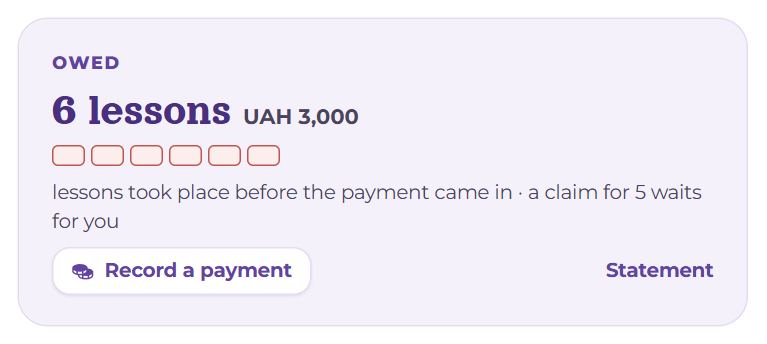
- “Paid ahead” or “Owed” — how many lessons and how much money.
- The pips: booked lessons the payment covers, the free remainder, or — red — the debt.
- Under them — “lasts until 7 Nov”, “lessons took place before the payment came in” or “all settled”, and “a claim for 5 waits for you” if the student has reported a payment.
- “Record a payment” — your own entry (see below); “Statement” — the statement.
In the “Ahead” block, next to the coming lessons, you can see where the payment runs out: “last one paid” and “unpaid until paid for”. When one lesson or less is left on the balance, the student gets a reminder.
The statement

Money → Statement or the student’s page → ⋯ → Terms and statement.
- The balance: the number of lessons — “lessons on the balance” or “unpaid lessons” — in money, and a line “paid 0 · done 6” · “1 more booked”.
- Terms — the price (“UAH 500 per 50 min, UAH 250 per 25 min”) and your text for the student. “Edit terms”: “Price for this student (empty — as in settings)”, the currency, “Payment details and terms” — say, a card number and “paid ahead for 10 lessons”. The student sees these terms when reporting a payment.

Here a claim has one more action: the “other number” field and “Confirm” — confirm a different number of lessons than the student wrote. A receipt, if attached, opens from the “receipt” link.
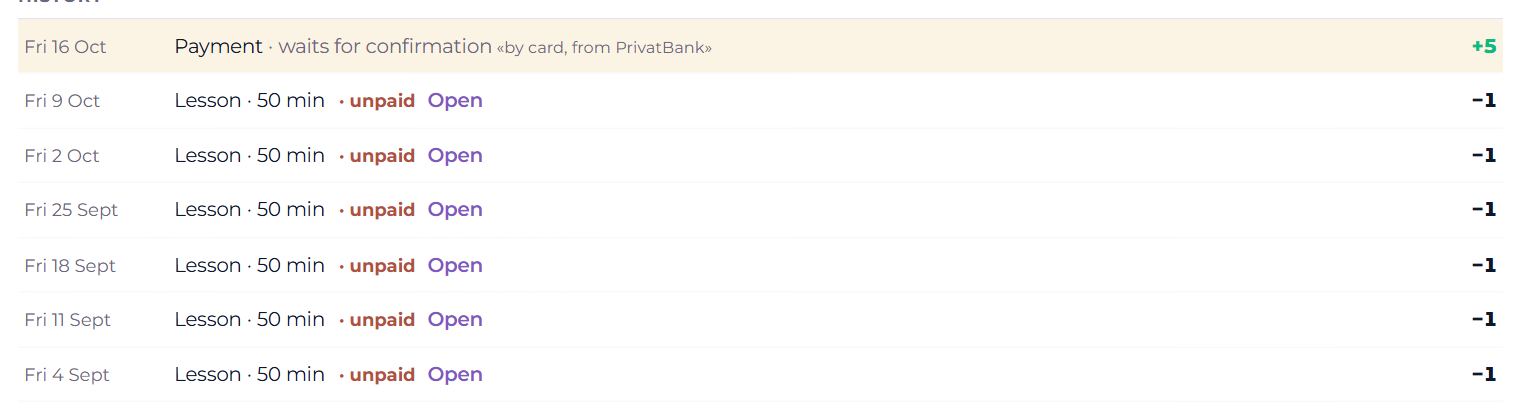
History — every line of the pair, newest first: payments (marked “waits for confirmation”, “not confirmed”), your entries and corrections, lessons marked “unpaid”, who did not come, late cancellations; on the right, plus or minus lessons. Next to a missed lesson and a late cancellation — “Deduct” / “Don't deduct”; next to each lesson — “Open”.
Recording a payment by hand
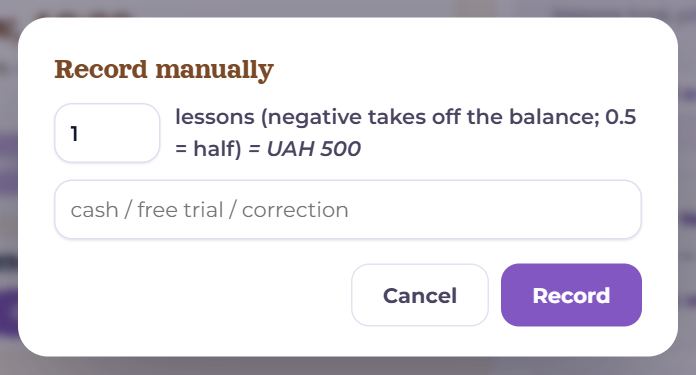
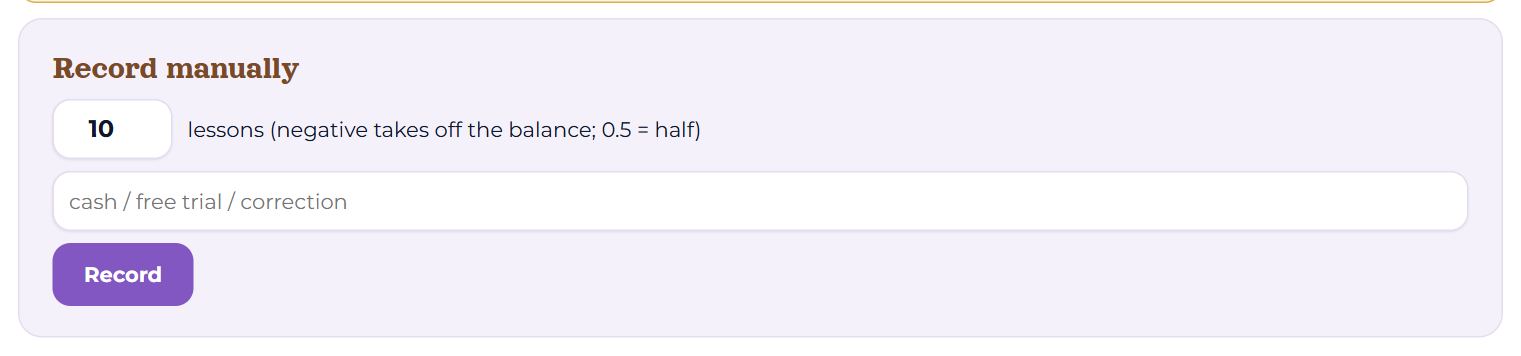
For cash, a lesson given as a gift, or a correction: “Record a payment” on the student’s page, or the “Record manually” form in the statement.
- The number — “lessons (negative takes off the balance; 0.5 = half)”: 10 adds ten lessons, −1 takes one off, 0.5 is half a lesson.
- A comment — “cash”, “trial as a gift”, “correction”.
- “Record” — the entry stands at once; the student does not need to confirm it. A minus shows in the history as “Correction”.
Correcting a lesson
For a week after a lesson, on the student’s page under “Past lessons” there is a “Correct the lesson” menu: “Mark as done” / “Mark as missed”, “It was 25 min” or 50, “Deduct” / “Don't deduct”. The balance and “Money” recount by themselves. A lesson held elsewhere is added by “Lesson outside Memova” in the same place — it is counted once the student confirms it.
Price
- The general one — Settings → Schedule and lessons → Booking rules → Price per 50-min lesson, with the currency.
- One for a single student — in the statement, “Edit terms”; an empty field means as in the settings.
- The price multiplies the lessons: change it and the money for the past is recounted too, because the books are kept in lessons.
On a phone
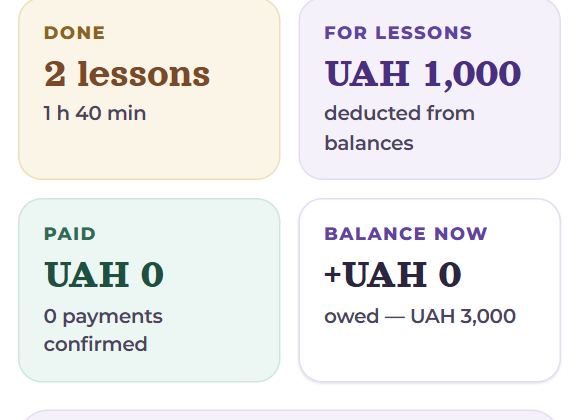
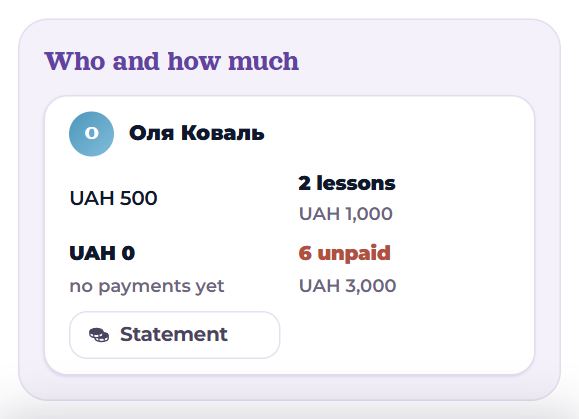
The tiles stand two in a row, and each student in “Who and how much” becomes a card of their own with the same numbers.
Questions
- Why is “Done” smaller than the number of lessons in the list?
- The list also has missed and cancelled lessons, and test calls. The tile counts only the ones deducted.
- A student paid for 10 but wrote 5.
- Open the statement, type 10 into “other number” and confirm.
- How do I give a lesson as a gift?
- “Record a payment” → 1 → “Record”, with a comment.
- Does the student see my entries?
- Yes, a pair has one statement: the student sees the same lines and the same balance.